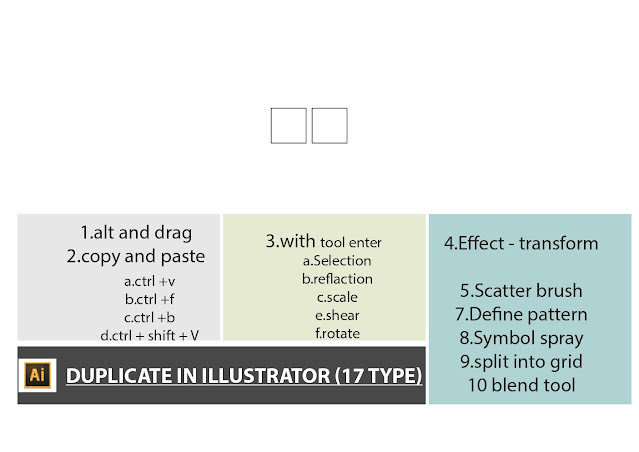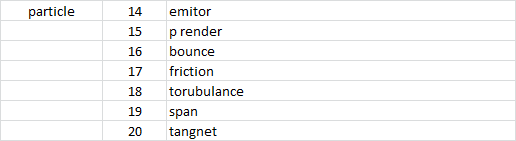
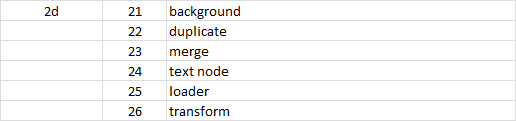
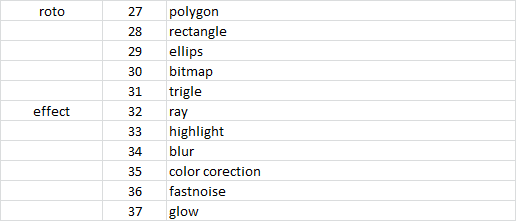
software syllabus and mini project

fusion


aftereffects
mini project


https://www.youtube.com/shorts/KrjXZbJFETI

---------------------------------------------------------------------------------------------------------------------


INDESIGN
mini project

----------------------------------------------------------------------------
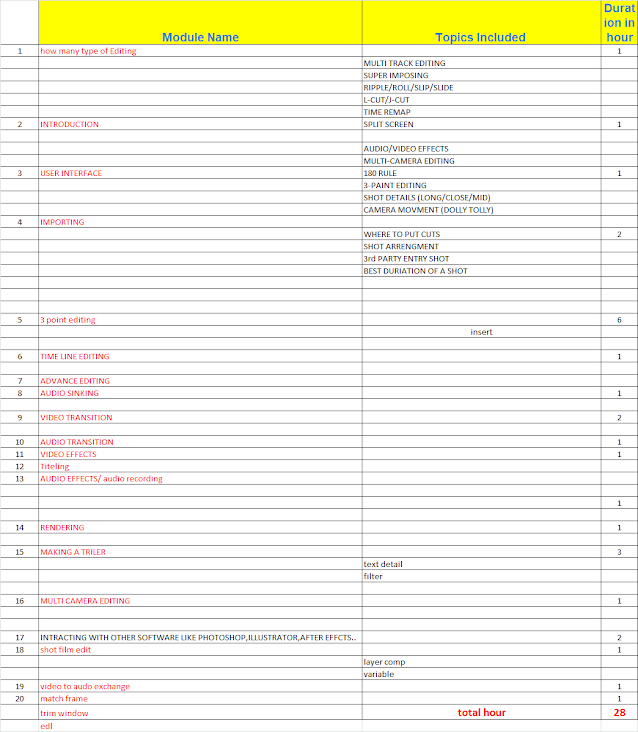

premier
mini project


--------------------------------------------------------------------


photoshop
mini project

----------------------------------------------------------------------
project  InDesign:

1. **Print Publications**
   - Books
   - Magazines
   - Brochures
   - Flyers and Posters
   - Newsletters
   - Business Cards and Stationery

2. **Digital Publications**
   - E-books
   - Interactive PDFs
   - Digital Magazines
   - Web and Mobile Content

3. **Marketing and Advertising Materials**
   - Advertisements
   - Catalogs
   - Packaging Design

4. **Corporate and Educational Materials**
   - Annual Reports
   - Presentations
   - Resumes and Portfolios

5. **Event and Media Materials**
   - Invitations
   - Programs and Menus
   - Press Kits

6. **Educational and Instructional Materials**
   - Textbooks and Study Guides
   - Infographics

illustrator_corel draw


Comments

Popular posts from this blog

TIPS AND TRICKS WITH HOTKEY

Indesign hotkey with tips and tricks 10/11/2017 1.TO GIVE HOT KEY ON PARAGRAPH OR CHARACTER STYLE NEED A NUM KEYBOARD 2.WE CAN ASSIGN A ALPHABET ON THE DEC TAB SETTER TO ALIGN link: https://learn.g2.com/what-is-graphic-design design field https://www.vistaprint.in/business-cards?txi=15626&xnid=TopNav_Visiting+Card&xnav=TopNav for all size print photoshop hotkey PHOTOSHOP SHORTCUTS Keys for viewing images This is not a complete list of keyboard shortcuts. This table lists only those shortcuts that are not displayed in menu commands or tool tips. Result Windows Mac OS Cycles through open documents Control + Tab Control + Tab Close a file in Photoshop and open Bridge Shift-Control-W Shift-Command-W Toggle between Standard mode and Quick Mask mode Q Q Toggle (forward) between Standard screen mode, Maximized screen mode, Full screen mode, and Full screen mode with menu bar F F Toggle (ba...

adobe animate cc

 flash / animate cc   16-4-24 animation can be done in 4 way 1 .frame by frame animation --------------------- f5 = key frame f6 = duplicate key frame f7 = blank frame shift +f5= remove frame ------------------------------- v= selection tool B = classic brush  k= paint bucket -------------------------------------------------- q= transform tool ctrl + x = cut ctrl + v= past in center of canvas ctrl + shift + v = past in same place ctrl + D = duplicate object in same layer ------------------ alt + shift+ o = show onion skin range alt + shift+ L = show loop range . = next frame , = previous frame enter = play ctrl + enter = swf player view ------------------------------- wdit multiple frame = to select range of frame at a time (the option is in the view port ) ------------------------------------------- shift +b= break apart in text to get it separate and convert it in to a graphics format so we can pull each art of the text ( two time shift + b if more alphabet ) -----...

nuke hotkey and silhouette

  ------------------------------------------------------------------------------------------------------------------------ note on silhouette paint 1=original 2=output =============================--------------------------------------------====== shift to take the source -------------------------------------------------------------------------------------------------------------- ctrl and drag to increase the brush size ====================---------------------------------------------------------========= make sure Alph on in brush setting --------------------------------------------------------------------------------------------------------------- increase the size of the setting  session- session setting-change the w and h so we can paint out area too ------------------------------------------------------------------------------------------------------------------------ we can add extra node to paint on the extended area 1.node graph- composite- composite ( connect it to t...